
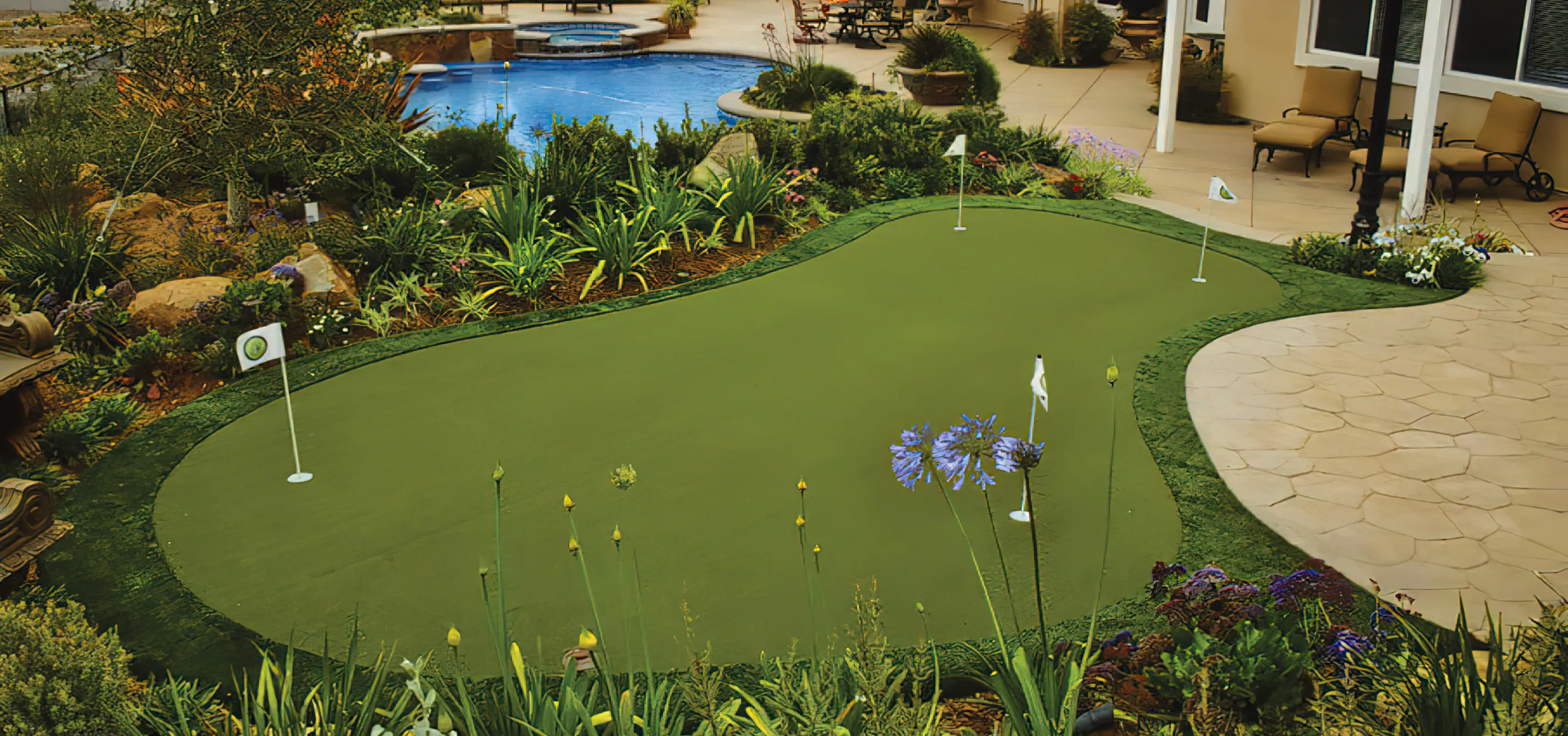
A putting green is a purpose-built turf surface designed for realistic ball roll, drainage, and long-term durability. Backyard greens are not decorative turf patches — they are shaped, compacted, and installed to perform consistently.
Putting greens are often integrated near patios, pools, or secondary yard spaces to create a defined recreational area without overwhelming the layout.
Location is the first decision. Greens work best in transitional yard spaces — not as isolated lawn features. Slope, drainage, and sun exposure all influence performance.
We design greens with subtle contouring for interest without creating unrealistic breaks. Surround materials — synthetic fringe, stone edging, or landscape beds — are selected to integrate the green naturally into the space.
We install synthetic turf putting greens. Natural grass greens require irrigation, mowing, and maintenance levels that aren’t realistic for most residential projects, so we focus on synthetic systems designed for consistent performance.
Excavation is typically 4–6 inches below finish grade, similar to patio preparation. The subgrade is compacted before base material is added.
The base system begins with clean ¾″ gravel, compacted in lifts to create structural stability. A finer 3/8″ chip or crusher run layer is installed above it for leveling and shaping. Contours and breaks are formed directly in this base layer. Once shaped, each contour is compacted so it locks in before turf installation.
Drainage is built into the base with slight surface pitch so water moves off the green into surrounding lawn areas. On flatter sites, perforated drain lines may be installed beneath the base to prevent pooling.
Cups are set into the compacted base before turf is laid. They are installed flush with finished height and secured so they remain square and stable under use.
Turf is laid and seamed using professional seam tape and adhesive. Seams are positioned strategically to avoid primary putting lines when possible and are pressed flat to prevent visible ridges. Fringe turf transitions are integrated cleanly with surrounding lawn or hardscape so the green reads as intentional rather than added.
Most failures occur when base compaction is rushed or drainage is ignored. Soft spots, dips, and pooling water almost always trace back to insufficient base prep.
Small putting greens designed for short game practice typically begin around $15,000–$25,000 depending on size, shaping, and cup count.
Mid-sized greens with multiple elevations, fringe integration, or surrounding hardscape commonly range from $25,000–$45,000 depending on contour complexity and access.
Larger custom greens with significant shaping, multiple pin locations, fringe transitions, and landscape integration often fall between $45,000–$75,000+ depending on excavation and grading scope.
Synthetic turf lawn replacement projects are typically priced by square footage and most commonly range from $12–$20 per square foot installed, depending on base preparation, access, and turf selection. Larger continuous lawn areas can reduce the per-foot cost, while smaller or highly segmented spaces increase labor intensity.
Primary cost drivers include excavation depth, base preparation, drainage requirements, contour shaping, turf quality, and site accessibility.
Design Considerations
Consider how much practice space you want, how realistic the breaks should feel, and how it integrates into the surrounding lawn or hardscape.
Common Pairings
Patios, seating areas, lighting, and privacy fencing.
Pricing Factors
Typically $15k–$60k+. Size, shaping complexity, and turf system influence range.
Service hero background image only maybe vh67 and since the content overlaps it some making it the level
Similar look where it looks like a page that overlaps the hero some. background black. Contains a left side for a rich text element for the content, a section for service specific FAQ, and on the right side a "at a glance" card with a rich text element. We need to find a way to show projects that feature this service. I added service tags to the portfolio cms.
H1 within the second section. hero only has image. so H1 is still first words on the page.
Rich Text for:
"What is it"
intro description explaining the problems the service solves, situations where it makes sense. Functinoal improvements, clarifies use cases and the value it brings to a space.
"Design Considerations" + Oten paired with
this talks about how its used and design in a space. other elements to consider mixiing this with. typical site constraints, scale etc. Talk about the kinds of materials used.
"How it's built"
talk about what goes into building this element. This could be as simple as describing the trenching for the gas line or complicated as the steps to a pool build. Talk about the the base that makes it last, the framing that gives it shape, and the finishes that make details count. Things like utilities, code restrictions and typical permiting requirements.
"Pricing Factors"
Talk about typical pricing ranges, what conditions affect the price more or less than others. Things that people "think is expensive but isnt" and "what peopled dont think is expensive but is." Scale obviously impacts price but so does installation complexity. talk about what that complexity looks like for each service.
"Service FAQ"
a service specific faq based on the faq cms filtered to the service. include the featured faqs at the end. I plan to have 2-3 featured ones about getting started.
"At A Glance"
floating card on the right
- Considerations: 2-3 sentences about its value, use in designs, and pairings.
- Pricing: 2 ranges with descriptions
- Featured projects: Is there a way to make a mini slider with the project name? Is that too much and just list 3-4 project names with the arrow icon?
- CTA to portfolio & get Started
"Photos of Service"
Condense the current 3 photos into a multi photo
"Related projects"
Some kind of ribon or grid showing related projects. The projects cms have a multi-picklist to tag services used on that project and can be used to filter matching projects here. The challenge